Technical step for seo

By // No comments:

 There are several technical SEO steps that you can take to optimize your website for search engines. Here are some of the most important ones:


Ensure your website is crawlable: Make sure that search engines can crawl and index your website. This means that you need to ensure that there are no crawl errors, broken links, or duplicate content on your website. You can use tools like Google Search Console to identify these issues.


Optimize your website speed: A fast-loading website is crucial for both user experience and SEO. Use tools like Google PageSpeed Insights or GTmetrix to identify areas where you can improve your website's loading time.


Use HTTPS: Google has indicated that HTTPS is a ranking signal, so it's important to ensure that your website is using a secure connection.


Optimize your website for mobile devices: With more people accessing the internet from mobile devices than ever before, it's important to have a mobile-friendly website. This means using responsive design and ensuring that your website is optimized for smaller screens.


Use structured data: Structured data helps search engines understand the content on your website better. You can use tools like Google's Structured Data Markup Helper to implement structured data on your website.


Optimize your website's URLs: Your website's URLs should be short, descriptive, and include relevant keywords. Avoid using URLs with special characters, numbers, or long strings of text.


Optimize your website's meta tags: Your website's meta tags, including the title tag and meta description, should accurately reflect the content on your website and include relevant keywords.


Use XML sitemaps: XML sitemaps help search engines understand the structure of your website and crawl it more efficiently. Make sure to submit your sitemap to Google Search Console.


By following these technical SEO steps, you can help ensure that your website is optimized for search engines and improve your chances of ranking well in search results.


Optimize your website's images: Optimize your images by compressing them to reduce their file size without losing quality. Use descriptive file names and alt tags to help search engines understand what your images are about.


Improve your website's internal linking structure: Internal links help search engines understand the structure of your website and which pages are most important. Make sure to link to important pages from other pages on your website, and use descriptive anchor text.


Ensure your website is mobile-first: With Google's mobile-first indexing, it's important to make sure that your website is optimized for mobile devices. This means using responsive design and ensuring that your website looks good on a variety of screen sizes.


Use canonical tags: Canonical tags can help avoid duplicate content issues by indicating to search engines which version of a page is the preferred version.


Optimize your website's robots.txt file: Your website's robots.txt file can help control which pages search engines are allowed to crawl and index. Make sure to review and optimize your robots.txt file to ensure that it's not blocking important pages.

indexing ideas

By // No comments:


Find Decling URL over Time

By // No comments:

 One of the FASTEST ways to boost your search traffic. 👇


The very first thing I did when I joined CustomerGauge last year?

Bring all their content into one place, and review which content was steadily declining.

This content:

- Once ranked well
- Had existing authority for those keywords

It just hadn't been touched in a while.

Some was outdated.

Some wasn't really hitting search intent.

Both let competitors take the top spot.

I spent about 1 hour each on 5-10 articles.

- Adding new sections
- Tweaking titles
- Trimming introductions
- Adding FAQs

Guess what?

The whole site shifted from 400 clicks a day to 600 in about 1 month.

An extra 4000 visitors per month.

These are the quickest of wins. They capitalize on your existing work.

Do this at least every year. ✌️

———

Assess the opportunity for yourself.

Download the template here: 

https://lnkd.in/efWjm4yR

Our Link: https://docs.google.com/spreadsheets/d/1nkAV8bLh62bh51zef5WyAfhkjfonub5jImgRieXjxtk/edit#gid=1449521163

PS. Downloaders will get early access to a content drop with some insane SEO case studies in it. (If you've already signed up in the past, DM to get the extra drop, having some issues)

Twitter Complete Details

By // No comments:

10 Formulas: How to Use Twitter to Drive Traffic to Your Blog


1.Use Short, Provocative Tweets Short tweets, under 100 characters get a 21% higher interaction rate. E.g.


2. Include Statistics: Interesting statistical information in your article, tweet about it

3.Use #Hashtags: Hashtags are a great way to spread your tweets to various topics. It is like keyword

4. Use @mentions: A mention is how you include Twitter users @usernames. They are a way you can send a tweet directly to followers, customers, or anyone on Twitter
5. Retweet Mentioned Blog Content: If someone mentions your blog content on Twitter, retweet their tweet.

6. Ask for a Retweet (or RT): Simply ask your followers to retweet, or RT your update.

7.Use Visually Appealing Images: appealing and enticing your blog post tweets are, the more they will be interacted with, and the more they will drive traffic back to your site.
8. Ask a Question Related to Your Topic:  A question in your tweet can generate lots of engagement.

9. Seasonal Events.: Use festival, seasonal events for the tweet on this occasion with the hashtag .Use hashtags such as #MothersDay to insert your business into the discussion.

9.Tweet about Your Blog-Hosted Contest: Running a contest, sweepstakes or group offer on your blog is a brilliant way to drive traffic to your site

10. Include a Blog Link in Your Bio: Your Twitter bio is what your followers (and others) see when they visit you on Twitter. It doesn’t change unless you make changes to it.


How to Optimize Your Twitter account for Search

1: Optimize Your Account for Twitter Search: Make sure your handle and username match your website and brand name.

2. Bio, Photo, and Link: Your bio, photo and link are the places to make changes and updates to promote campaigns or events

3. Twitter Bio: Twitter indexes your bio regularly, so any changes affect your relevancy score in the search. You can use up to 160 characters in your bio section, so make the most of them.

4. bio link: It is sending your Twitter followers to. The safest option is to use the main page of your brand’s website because it usually has the best SEO authority

5. Add Google’s Markup Code to Your Website: (Twitter Cards) Google lets you embed code in your website to specify your preferred social accounts, like Twitter, to include in search results

Twitter Cards

With Twitter Cards, you can attach rich photos, videos, and media experiences to Tweets, helping to drive traffic to your website. Simply add a few lines of markup to your web page, and users who Tweet links to your content will have a “Card” added to the Tweet that’s visible to their followers

The different Card types each have a beautiful consumption experience built for Twitter’s web and mobile clients:

  • Summary Card: Title, description, and thumbnail.
  • Summary Card with Large Image: Like the Summary Card, but with a prominently-featured image.
  • App Card: A Card with a direct download to a mobile app.
  • Player Card: A Card that can provide video/audio/media.

Get started in 4 simple steps  :

  1. Choose a card type to implement.
  2. Add the correct meta tags to the page.
  3. Run the URL through the validator tool to test. If you are working with a Player Card, request approval for whitelisting. All other Cards do not need whitelisting.
  4. After testing in the validator or approval of your Player Card, Tweet the URL and see the Card appear below your Tweet in the details view.

Some Useful Free Tools in Twitter:

  • Tweepi.com: Give details for who to follow, retweet etc, follow follower list
  • manageflitter.com: Very Good List to unfollow users
  • followerwonk: Analyze the twitter account. Give the details of follower distribution, active hour, social rank. Etc
  • friendorfollow.com: Sort and filter your followers.
  • www.trendinalia.com/twitter-trending-topics &  trends24.in : Are used for Getting Trends
  • Twitter Dictionary: A Guide to Understanding Twitter Lingo (Short Word ): www.webopedia.com/quick_ref/Twitter_Dictionary_Guide.asp

How to Analyze Twitter Data: -

Twitter data can give you insights into type of information stored for your account. It provides an easy way for you to view details about your account, and to make changes as you see fit.

  • Account Home: It gives Total tweets, tweet impressions, profile visits, mentions
  • Tweet activity: It gives you a broad view of the number of Tweets and organic impressions
  • Audience Insights: Give the details Top Interest, Top Language, Top Interest Type, Mobile Footprint
  • Twitter Events: On the events section, you can see an overview of the biggest events trending on Twitter.  This means you should know when important industry-related events are happening.


What is international SEO?

By // No comments:
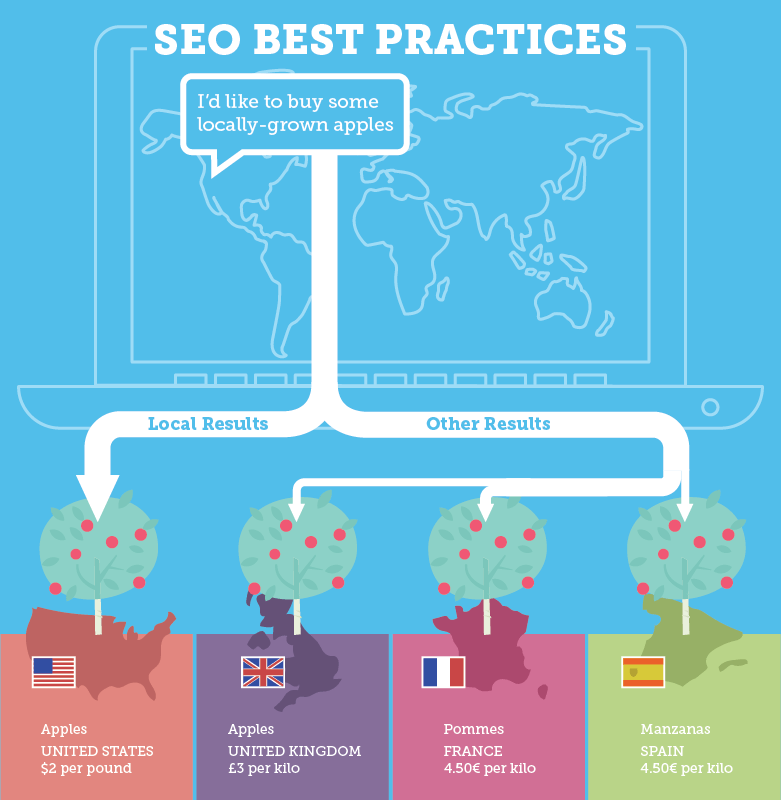
What is international SEO?
International SEO is the process of optimizing your website so that search engines can easily identify which countries you want to target and which languages you use for business.


Other signals to show search engines that your site targets a specific country include:
  • Hosting your site on a local IP
  • Linking to local content
  • Building links from local resources
  • Finding ways to rank on local search engines like Yandex in Russia and Baidu in China


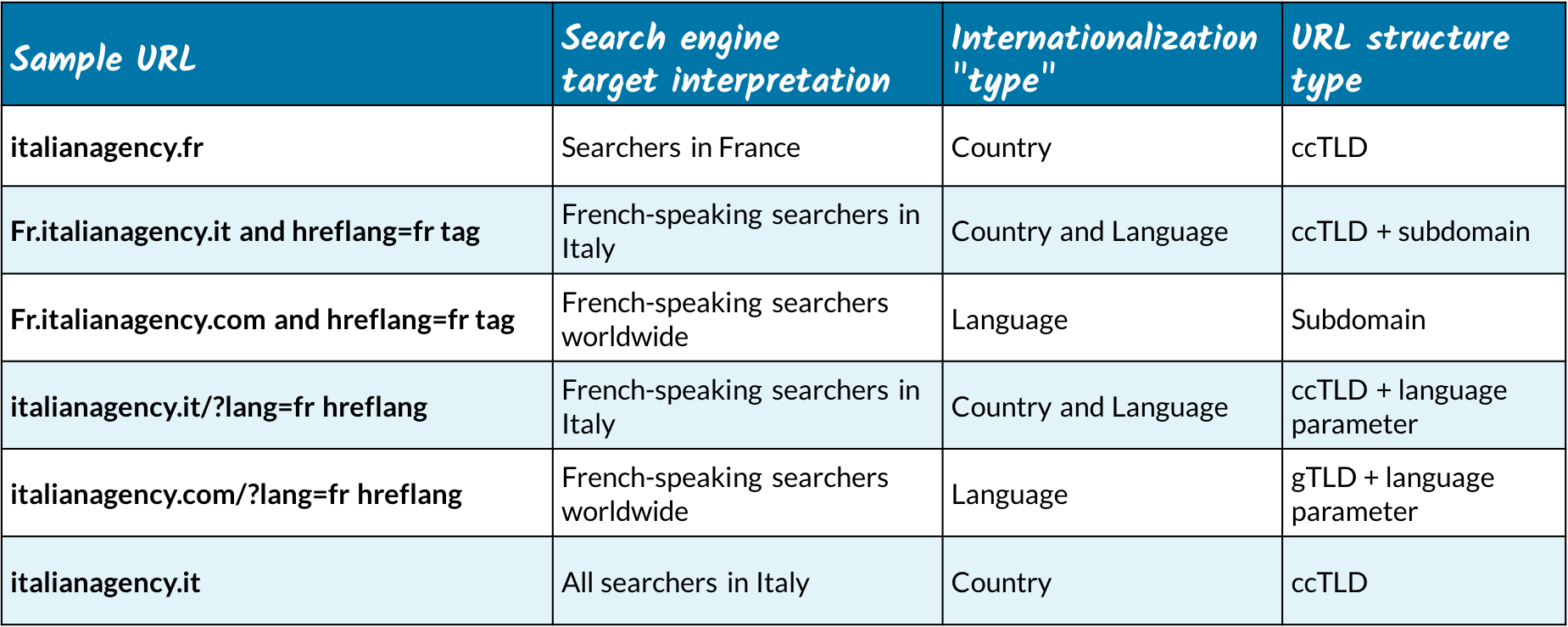
International targeting in a nutshell

If you're targeting a specific country, think about using a ccTLD. But, if you are focusing on language targeting only, a ccTLD probably isn't your best choice as they're meant for targeting a specific geographic area and not specifically the language spoken there. In these cases, you'll likely want to use a different internationalization technique such as using hreflang, subfolders, or subdomains in combination with or instead of using a ccTLD. If you choose not to use a ccTLD for your internationally targeted site, check out this discussion of the pros and cons of subdirectories versus subdomains.